The idea
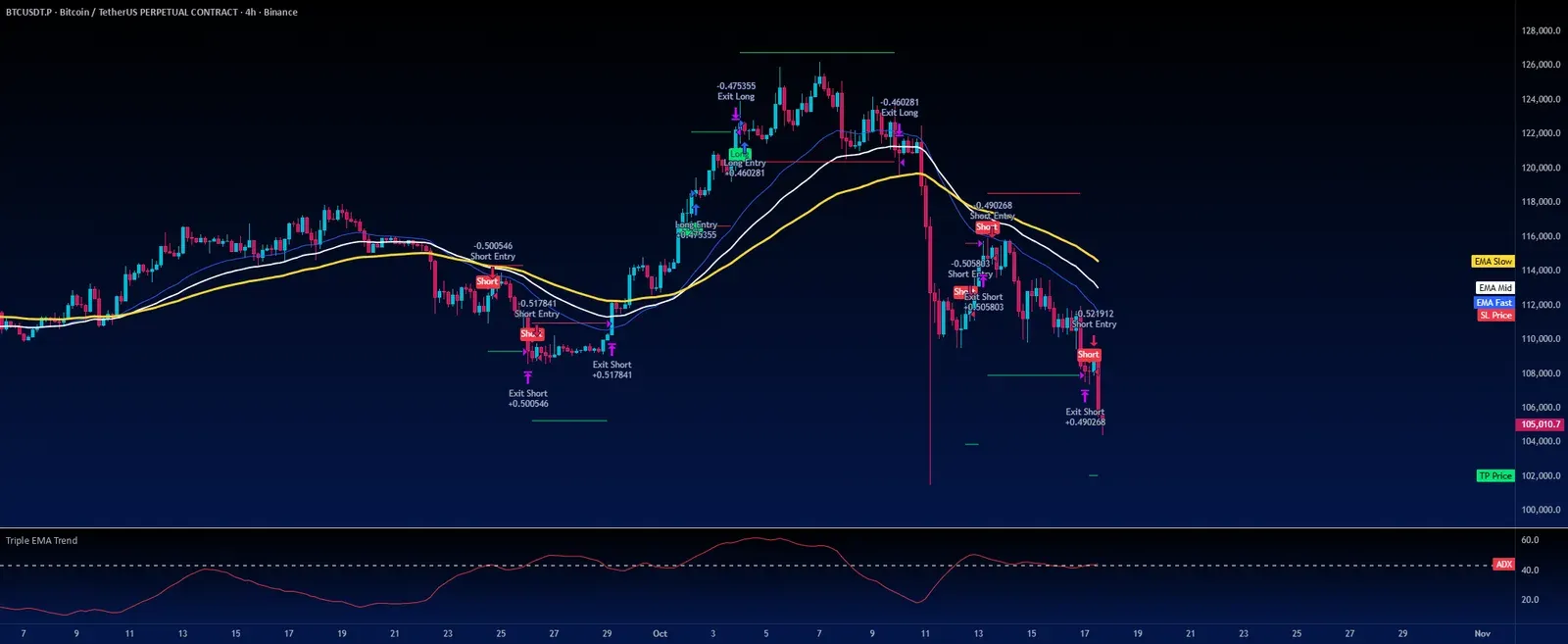
This is a trend-following system that waits until a trend is already under way. Rather than calling tops and bottoms, it enters only once three EMAs are stacked in order and ADX confirms the move is strong. Stop-loss and take-profit levels are set from ATR at entry and are never moved afterwards.
Despite “Turtle” in the title, the script does not use the classic Turtle Donchian-channel breakout. Its core is EMA alignment filtered by ADX. It is a Pine Script v6 strategy(), so it runs straight in the Strategy Tester.
Indicators
- Three EMAs of the close: fast 30, mid 46 and slow 80.
- ADX: the script computes DMI/ADX itself (RMA-smoothed +DI and −DI) over 14 bars. A trend only counts as strong when ADX is above 43, which is a demanding threshold, so expect relatively few trades.
- ATR(14): used only on the entry bar to size the stop and target distances.
Entry rules
- Long: ADX above 43, fast EMA > mid EMA > slow EMA, and the close above the fast EMA.
- Short: ADX above 43, fast EMA < mid EMA < slow EMA, and the close below the fast EMA.
- Only one trade at a time: no new entry until the current one has hit its stop or target.
- Signals are confirmed on the bar close; with TradingView’s default fills, orders execute at the next bar’s open.
Exits and position sizing
- Stop-loss: 1.8 × ATR from the signal bar’s close (below for longs, above for shorts).
- Take-profit: 3.3 × ATR from the same close. With the defaults, the target sits about 1.8 times as far away as the stop. That is a parameter ratio, not a win rate or an expected return.
- Both orders are placed once at entry through strategy.exit (stop and limit) and are not trailed.
- Size: 5% of equity per trade, with 0.075% commission.
Inputs (source defaults)
| Input | Default | Purpose |
|---|---|---|
| ADX Length | 14 | Lookback for DMI/ADX |
| ADX Threshold | 43 | Minimum ADX required to enter |
| EMA Fast / Mid / Slow | 30 / 46 / 80 | EMAs used to check alignment |
| ATR Length | 14 | Volatility basis for stop and target |
| Stop Loss ATR Multiplier | 1.8 | Stop distance = 1.8 × ATR |
| Take Profit ATR Multiplier | 3.3 | Target distance = 3.3 × ATR |
| Start / End Date | 2021-01-01 / 2030-07-20 | Backtest window (written in UTC+3) |
| Go Long / Go Short | On / Off | Long-only by default |
Things to know before using it
- It is long-only by default. The shorts in the author’s chart appear because Go Short was switched on.
- With shorts switched off, the script still tracks a “virtual” short whenever a short setup appears, and it skips new long signals until that virtual trade reaches its own stop or target. That is how the current code behaves, so keep it in mind when reading backtests.
- Stops and targets are anchored to the signal bar’s close, while the fill happens at the next open, so large gaps can push the two apart.
- There is no request.security call and no external library. fill_orders_on_standard_ohlc is enabled, so fills use standard OHLC prices even on Heikin Ashi charts.
- The author only shows the BTC perpetual on the 4-hour chart. Backtest other coins or timeframes on their own and consider re-tuning the ADX threshold first.
Installing it on TradingView
- Download the .pine file from Coinpred (active membership required, see below), or check the original page for the latest version.
- Open the Pine Editor on TradingView, create a blank script, paste in the full source and save.
- Click Add to chart. ADX appears in a separate pane, while the EMAs and stop/target lines are drawn on the price chart.
- Check the defaults against the table above, then adjust them for your market and timeframe.
- Study the signals and fills in the Strategy Tester before setting up alerts. Past results do not guarantee future returns.
About backtest figures
Source, license and version
- Author: cyatophilum. Original title: Turtle Strategy - Triple EMA Trend with ADX and ATR. Version 2.0 (pine-facade).
- License: Mozilla Public License 2.0 (MPL 2.0). Coinpred provides the full, unmodified source.
- Original page: https://www.tradingview.com/script/vzXlqRCT-Turtle-Strategy-Triple-EMA-Trend-with-ADX-and-ATR/
- Pine version: v6; script type: strategy().
- Images come from the author’s publication page, are not covered by the MPL, and are captioned “Author showcase”.
- Downloads are subject to Coinpred membership terms. If you modify the source file, the modified file must remain under MPL 2.0.