What the strategy is trying to do
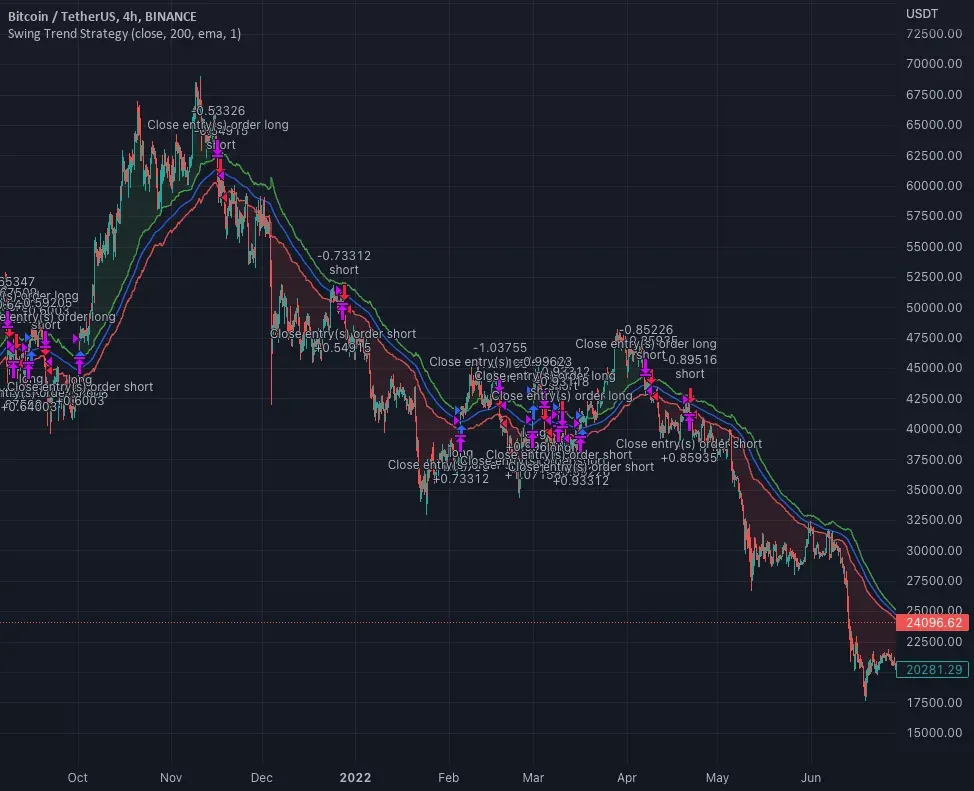
This is an open-source script by Inkedlau. The script title is “Swing Trend Strategy.” It plots a longer moving average (a 200-period EMA by default) and uses a 10-period ATR to pad a buffer above and below that average. The idea is straightforward: treat the market as an uptrend only after price closes above the average plus ATR, and as a downtrend only after it closes below the average minus ATR. While price sits between those two bands, the script does not open a new trade, and a modest drift back toward the average is not, by itself, a reverse signal.
The author's chart is BINANCE:BTCUSDT on the 4-hour timeframe, so this entry is filed under BTC. The script does not hard-code a symbol and will load on other charts, but the guide and the image follow that publication chart. The author says the 4-hour timeframe is the one they prefer and also mentions ETH; that is just the publication note, and this page does not verify it. Each entry is sized at 100% of equity, commission is 0.1 (Pine's default unit is percent, so 0.1%), and initial capital is 1000. The size is aggressive, so change the properties for your venue before you read the tester.
How the indicators are calculated
- The trend average is set by Moving Average Type and Trend Length. The default is a 200-period EMA of Source, and Source defaults to the close. You can switch the average to SMA, RMA, WMA, or VWMA.
- ATR is ta.atr(10). That length is hard-coded at 10 and has no input. ATR Threshold defaults to 1 and scales the ATR before it is added to or subtracted from the average.
- The upper line uptrend is the average plus ATR times the multiplier; the lower line downtrend is the average minus that amount. The variable names sound like trend states, but they are only the two bands.
- Entries and exits compare Source, not a hard-coded close. If you change Source, the signals move with it. One of the fill comparisons still uses close, so the shading can disagree with the signals.
- There is no date window and no separate stop or target price.
Entry rules
- Long (order name long): there is no open position, and Source is above the upper band (average plus ATR times the multiplier).
- A short (order name short) does not fire by default. It only opens if you enable Open Short Positions?, there is no open position, and Source is below the lower band (average minus ATR times the multiplier).
- The script does not add to a position or flip it in place. To change direction you first have to meet the exit, then wait for a later bar that meets the entry.
- The source does not wait for barstate.isconfirmed. On a 4-hour chart, whether Source has cleared the upper band can still change before the bar ends; whether a fill stands depends on your TradingView order settings.
Exits and position size
- Exit trade on Moving Average Cross? is on by default. In that mode, a long exits when Source falls back below the average itself, not only after it breaks the lower band.
- If you turn that option off, a long waits until Source is below the lower band (average minus ATR times the multiplier), so the trade can run longer.
- Shorts are symmetric: after you enable them, the default exit is Source moving back above the average; with the cross exit off, the short waits until Source clears the upper band.
- There is no strategy.exit and no fixed stop or take-profit order. Exits come only from those Source comparisons.
- Each entry is 100% of equity, and pyramiding is set to 1. The notional changes with the symbol and account equity, so treat the size as your own risk setting.
Inputs (source defaults)
| Input | Default | Role |
|---|---|---|
| Open Short Positions? | false | Allows short entries. The script is long-only by default. |
| Exit trade on Moving Average Cross? | true | When on, longs exit as Source crosses below the average and shorts exit as it crosses above. When off, the exit waits for the opposite ATR band. |
| Source | close | Price used for the entry and exit tests, and the input to the moving average. |
| Trend Length | 200 | Length of the moving average. |
| Moving Average Type | ema | One of sma, ema, rma, wma, or vwma. |
| ATR Threshold | 1 | Distance from the average to each band, as a multiple of the 10-period ATR. The ATR length itself cannot be changed. |
Things to know before using it
- The default size is 100% of equity, commission is only 0.1%, and initial capital is 1000. Live bitcoin fees and slippage often differ, so tester results are not a live forecast.
- The ATR length is hard-coded at 10. Changing ATR Threshold or the average length does not change how many bars the ATR uses.
- The default exit looks at the average, not the lower band. A long can leave as soon as price falls back to the average, even if it never reaches the average minus ATR.
- One of the green or red fills compares close with the bands. If you change Source, the shading may not match the signals. That is display only.
- The comments have typos such as ACCODINGLY and BLOW; they do not change the entry and exit logic as written. The orders still use the older when= argument, which runs in Pine v5.
Installing it on TradingView
- Download the .pine file from Coinpred (active membership required, see below), or check the original page for a newer version.
- Open the Pine Editor, create a blank script, paste the full source, and save.
- Click Add to chart. To match the author image, start with BINANCE:BTCUSDT on the 4-hour timeframe.
- Review the position size, commission, average type, and ATR multiple in the strategy properties, then inspect fills in the Strategy Tester.
- Past tester results do not guarantee future returns.
About backtest figures
Source, license and version
- Source: https://www.tradingview.com/script/Z51SyFk2-Swing-Trend-Strategy/
- Author: Inkedlau. Source version 1.0 (Pine v5), scriptAccess=open_no_auth.
- License: Mozilla Public License 2.0. Redistribution must keep the copyright and license notices; modified files must remain under MPL 2.0. Coinpred ships the unmodified full source.
- Members can download the .pine file on this page to study the rules. Judge the risk yourself, and follow your venue's rules.