The idea
This open-source script from PresentTrading turns the distance between price and a moving average into a standardized Z-score, then trades crosses of a set threshold. The math is short: subtract an EMA from price, and divide by the standard deviation over the same lookback. The script is drawn in a separate pane (overlay=false); on the main chart it can only tint the candles, and that tint can be switched off.
One mismatch with the publication page should be stated up front. The write-up talks about price often returning to its mean, which sounds like mean reversion. In the source, a long is opened when the Z-score crosses above the positive threshold, and a short when it crosses below the negative threshold — after price has already stretched, the trade goes with that stretch. The rules below follow the source, not that introductory wording.
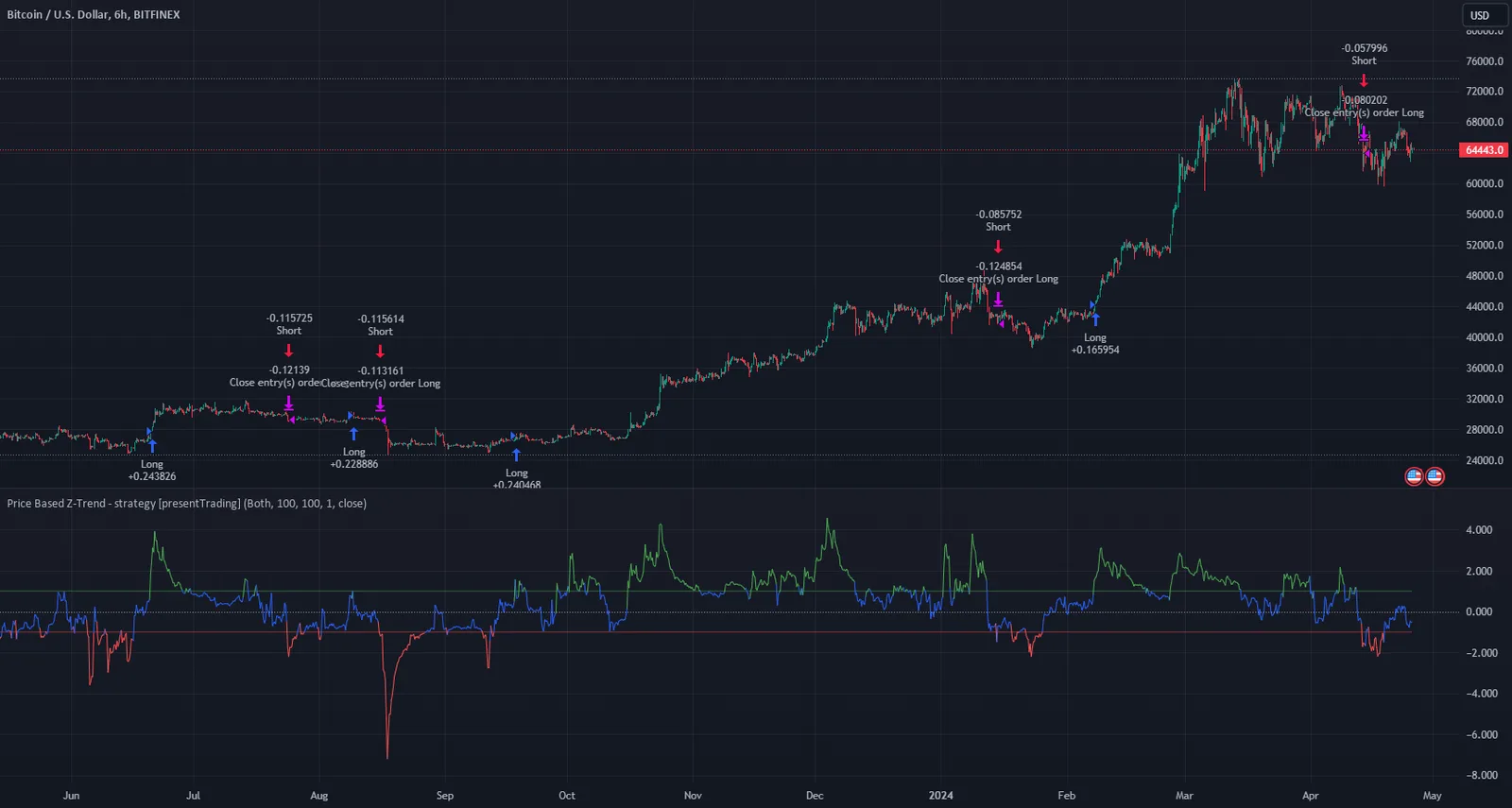
The chart on the publication page is BITFINEX:BTCUSD on the 6-hour timeframe, so this page is filed under BTC. The script is not hard-coded to one symbol and will load elsewhere, but the walkthrough and the image stay with the author’s chart.
Indicators
- The price source defaults to the close and can be changed with the Source input.
- Z-score: priceZScore = (priceSource − ta.ema(priceSource, priceAverageLength)) / ta.stdev(priceSource, priceDeviationLength). Both lengths default to 100.
- Threshold defaults to 1. The pane plots +Threshold and −Threshold, plus a dotted zero line.
- The Z-score plot is colored by zone: green above the upper threshold, red below the lower one, and blue in between.
Entry rules
- The default side is Both; it can be set to long only or short only.
- Long: priceZScore crosses above Threshold (default +1), and longs are allowed. The tester name is Long.
- Short: priceZScore crosses below −Threshold (default −1), and shorts are allowed. The tester name is Short.
- The tester defaults to 10% of equity, 0.1% commission, slippage 1, 10,000 initial capital, and USD as the currency.
Exits and position sizing
- A long is closed when the Z-score crosses below −Threshold. A short is closed when it crosses above +Threshold. There is no separate stop or take-profit input.
- In the default Both mode, a long entry and a short exit are the same event, and so are a short entry and a long exit. A cross above +1 covers a short and opens a long; a cross below −1 covers a long and opens a short. The book stays in the market and flips at the two thresholds.
- In long-only mode, a cross above +1 enters and a cross below −1 exits, so the strategy can sit flat between those events. Short-only is the mirror of that.
- Optional bar coloring is on by default. The color branches in the source are loosely written: after the “greater than the threshold” case, the next test is priceZScore < Threshold, which is almost always true, so the later red branch is hard to reach. Do not treat the candle colors as a strict map of all four zones.
Inputs (source defaults)
| Input | Default | Purpose |
|---|---|---|
| Trading Direction | Both | Long, short, or both sides |
| Standard Deviation Length | 100 | Lookback for the standard deviation |
| Average Length | 100 | Lookback for the EMA |
| Threshold | 1 | Z-score multiple used for entries and exits |
| Bar Color | true | Tint price bars from the Z-score |
| Source | close | Price series used in the Z-score |
Things to know before using it
- The publication text leans toward mean reversion; the source follows a threshold break in the same direction. Trust the source.
- Standard deviation sits in the denominator. When realized volatility suddenly contracts, the Z-score can jump and cross the thresholds more often. That is inherent to the formula, not an extra filter.
- The script lives in a pane. The main chart, by default, only shows candle tint. To see the EMA itself you have to add one, or just read the Z-score in the pane.
- priceLongCondition and priceExitLongCondition are assigned the same tests as the later long and short conditions; they do not add a second rule set.
- Coinpred already lists two PresentTrading strategies (liquidity breakout and dual RSI differential). This one is a price Z-score cross, with a different rule set.
Installing it on TradingView
- Download the .pine file from Coinpred (active membership required, see below), or check the original page for a newer version.
- Open the Pine Editor, create a blank script, paste the full source, and save.
- Click Add to chart. To match the author image, start with Bitfinex BTCUSD on the 6-hour timeframe. The script will appear in a separate pane.
- Set the direction and threshold first, then review the flip points in the Strategy Tester.
- Past tester results do not guarantee future returns.
About backtest figures
Source, license and version
- Source: https://www.tradingview.com/script/IrnAzTAU-Price-Based-Z-Trend-Strategy-presentTrading/
- Author: PresentTrading. Source version 1.0 (Pine v5), scriptAccess=open_no_auth.
- License: Mozilla Public License 2.0. Redistribution must keep the copyright and license notices; modified files must remain under MPL 2.0. Coinpred ships the unmodified full source.
- Members can download the .pine file on this page to study the rules. Judge the risk yourself, and follow your venue’s rules.