The idea
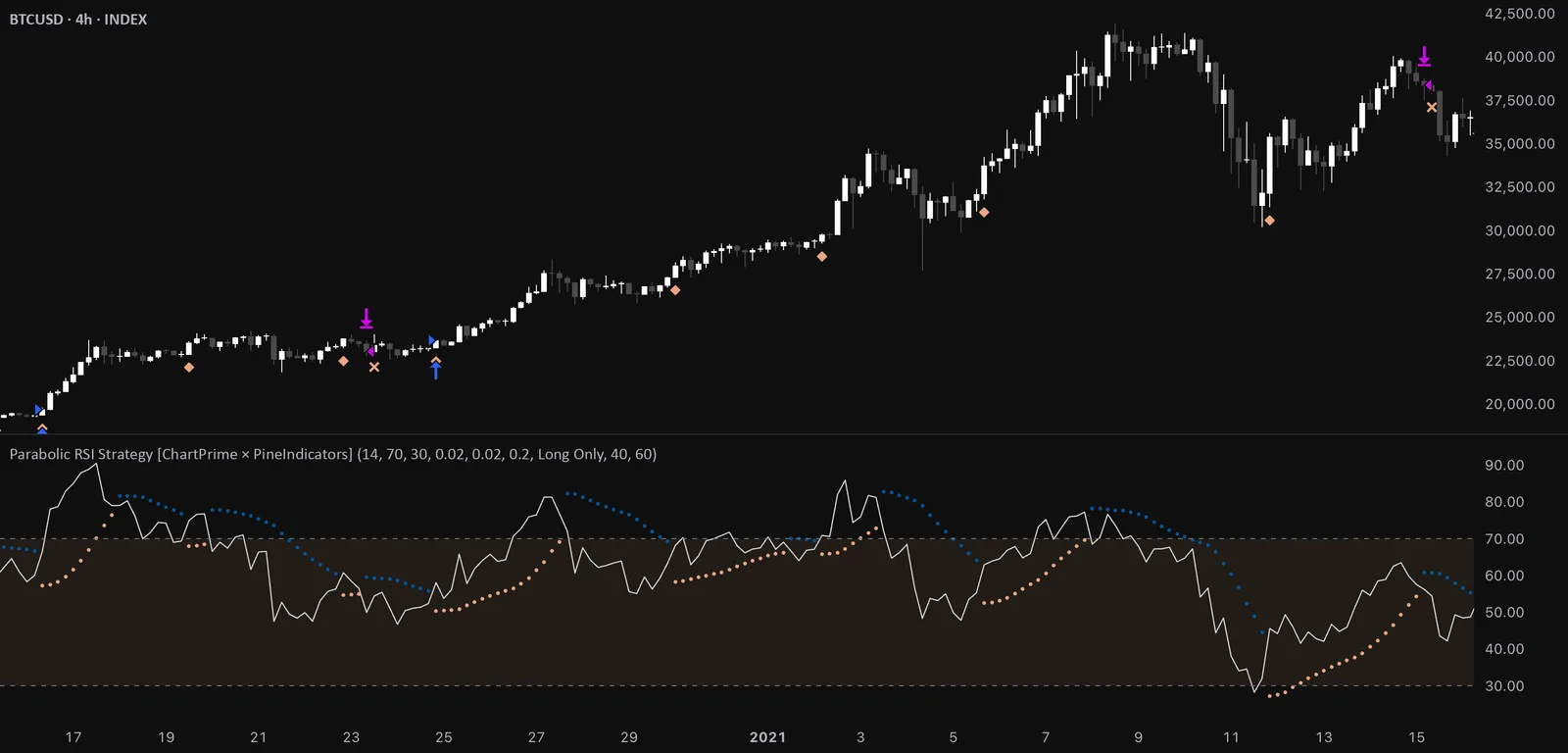
This is PineIndicators' open-source script titled Parabolic RSI Strategy [ChartPrime × PineIndicators]. The SAR is not computed on price. The script first builds an RSI of the close, then feeds that RSI into a custom Parabolic SAR. When the SAR flips from above RSI to below it, or the other way around, that is treated as a turn in the RSI trend and used to enter. The publication credits ChartPrime's original indicator, also under MPL 2.0.
The author's publication chart is CRYPTO:BTCUSD on the 4-hour timeframe, so this entry is filed under BTC. The script is not hard-coded to one symbol; it will load on other charts, but the write-up and the image follow that publication chart. The strategy itself is drawn in a separate pane (overlay=false), with entry and exit markers forced onto the price chart.
How the indicators are calculated
- RSI: ta.rsi of the close over RSI length (default 14).
- Parabolic SAR on RSI: the pineSar function does not use the bar high and low. It treats RSI + 1 and RSI − 1 as stand-in highs and lows, then applies Start, Increment, and Maximum (defaults 0.02 / 0.02 / 0.20). It returns the SAR value and a boolean isBelow (whether SAR is under RSI).
- Long signal sigLong: isBelow changes and the new value is true, i.e. SAR has flipped under RSI. Short signal sigShort: isBelow becomes false, i.e. SAR has flipped over RSI.
- The RSI filter is off by default. The 70 / 30 thresholds are only used to draw lines and a fill; they do not block entries. If you turn on Enable RSI filter, a long also needs RSI ≥ Long only if RSI ≥ (default 50), and a short needs RSI ≤ Short only if RSI ≤ (default 50).
- The strategy uses 20% of equity per entry, pyramiding=0, commission_value=0.01 and slippage=1. It does not set commission_type, so Pine's default type applies. margin_long and margin_short are both 0; check what that means in the strategy properties before you trade it.
Entry rules
- Long (order name Long): sigLong fires, the optional RSI filter passes, Trade direction is not Short Only, and position size is ≤ 0. If a short is open, the script calls strategy.close("Short") and then strategy.entry("Long", strategy.long).
- Short (order name Short): sigShort fires, the optional RSI filter passes, Trade direction is not Long Only, and position size is ≥ 0. An open long is closed before the short is entered.
- The default Trade direction is Long & Short. A second signal in the same direction does not add size (pyramiding=0, and the long branch requires size ≤ 0).
- There is an input called Reverse on opposite signal (doReverse), default off, but the source never reads that variable. In the default both-sides mode, an opposite signal already closes and reverses; the switch does not change that.
- The source does not wait for barstate.isconfirmed. A SAR flip can appear before the bar closes; whether the fill stands depends on your TradingView order settings.
Exits and position size
- In the default both-sides mode there is no take-profit or stop-loss. The exit is the opposite SAR flip: the short branch closes Long, and the long branch closes Short.
- If you set Short Only, a long signal does not enter long; it only calls flatten("Short"). Long Only does the mirror with flatten("Long"). flatten closes by the order id it is given. If that id does not match the open position, the close may do nothing. Check exits yourself if you run one side only.
- Each entry is 20% of equity, with no pyramiding. What that notional is worth changes with the symbol and equity, so treat the size as your own risk setting, not as a recommended allocation.
Inputs (source defaults)
| Input | Default | Role |
|---|---|---|
| RSI length | 14 | Lookback for RSI of the close. |
| RSI upper / lower threshold | 70 / 30 | Drawn on the RSI pane only; they do not gate entries by default. |
| Show SAR dots | true | Whether to plot SAR on the RSI pane. |
| Start / Increment / Maximum | 0.02 / 0.02 / 0.20 | Acceleration settings for the SAR computed on RSI. |
| Trade direction | Long & Short | Both sides, or long-only / short-only. |
| Reverse on opposite signal | false | Declared but unused; changing it does not alter the current order logic. |
| Enable RSI filter | false | Optional extra RSI side filter on entries. |
| Long only if RSI ≥ / Short only if RSI ≤ | 50 / 50 | Used only when the RSI filter is on. |
Things to know before using it
- The 70 / 30 levels look like overbought and oversold gates, but by default they are only drawn. A long can fire without RSI being under 30.
- The doReverse switch is not wired up. The publication's remark about reversing on the opposite signal already describes the default both-sides branch, and that switch does not control it.
- In long-only or short-only mode, flatten may close the wrong order id, so an opposite signal may not flatten the open trade.
- margin_long and margin_short are set to 0, which is not the usual 100 (no leverage). Check the strategy properties after you add it.
- Only a commission value of 0.01 and 1 tick of slippage are set; the commission type is left at Pine's default. On shorter timeframes, live costs can differ from the tester.
Installing it on TradingView
- Download the .pine file from Coinpred (active membership required, see below), or check the original page for a newer version.
- Open the Pine Editor, create a blank script, paste the full source, and save.
- Click Add to chart. To match the author image, start with CRYPTO:BTCUSD on the 4-hour timeframe.
- Review the trade direction, the optional RSI filter, and the size and margin in the strategy properties, then inspect fills in the Strategy Tester.
- Past tester results do not guarantee future returns.
About backtest figures
Source, license and version
- Source: https://www.tradingview.com/script/8F1vlPeb-Parabolic-RSI-Strategy-ChartPrime-PineIndicators/
- Author: PineIndicators (concept credited to ChartPrime). Source version 1.0 (Pine v6), scriptAccess=open_no_auth.
- License: Mozilla Public License 2.0. Redistribution must keep the copyright and license notices; modified files must remain under MPL 2.0. Coinpred ships the unmodified full source.
- Members can download the .pine file on this page to study the rules. Judge the risk yourself, and follow your venue's rules.