The idea
This is a structure breakout system, not an RSI or moving-average crossover. It uses pivot highs and lows with length bars on each side to find a contraction—a lower pivot high plus a higher pivot low—then waits for price to leave that box. A break above the top goes long; a break below the bottom goes short.
The author states that the idea is mainly inspired by LuxAlgo’s Master Pattern script. In this source, Supertrend is used only for the default stop: the Supertrend direction filter on entries is commented out, so trades do not require Supertrend alignment. The dotted liquidity lines are also visual only and never appear in the entry or exit conditions. The script is Pine Script v5 strategy() code.
Indicators
- Contraction detection: ta.pivothigh / ta.pivotlow with a default 12-bar left and right lookback. When a new pivot high is below the previous one (pht = -1) and a new pivot low is above the previous one (plt = 1), the script stores that pair as top and btm.
- Bullish break isbull: high from length bars ago is above top, and top > btm. Bearish break isbear: low from length bars ago is below btm, and top > btm. Using high[length] / low[length] lines the test up with pivot confirmation lag.
- Supertrend: period 10 and multiplier 3.0 by default, used as the stop price only when Stop Loss Type is SuperTrend.
- Liquidity levels: a second, longer pivot (default 20) draws dotted upper and lower lines. Once price tags a line it is marked as reached, but those lines are not part of strategy.entry or strategy.exit.
- The on-chart boxes and midpoint line show the master pattern and major/minor styling; they do not place orders on their own.
Entry rules
- Long, short or both, controlled by Trade Direction (default Both).
- bullishEntry is simply isbull, and bearishEntry is isbear; Supertrend direction is not applied.
- When the direction setting allows it, the script calls strategy.entry("Buy", long) or strategy.entry("Sell", short).
- The strategy() header sets default_qty_type = strategy.cash first, then overrides it with strategy.percent_of_equity and default_qty_value = 10. In Pine the later declaration wins, so the default size is 10% of equity.
- Commission is set to 0.1%, slippage to 1, and initial capital to 10,000.
Exits and position sizing
- The default stop type is SuperTrend: longs and shorts both attach a stop at the Supertrend line.
- If you switch to Fixed Percentage, the long stop is close × (1 − fixedPercentage). The default fixedPercentage is 0.1, which means 10%, not 0.1%.
- If you choose None, that branch does not place a stop.
- A bearish break while long runs strategy.close("Buy"); a bullish break while short runs strategy.close("Sell"). An opposite signal can both flatten the open trade and open the other side.
- There is no fixed take-profit target. Profits mainly come from an opposite break, or the Supertrend / fixed-percent stop being hit.
Inputs (source defaults)
| Input | Default | Purpose |
|---|---|---|
| Trade Direction | Both | Long only, short only, or both |
| Contraction Detection Lookback | 12 | Left/right bars for contraction pivots |
| Liquidity Levels | 20 | Pivot length for liquidity lines (visual only) |
| Stop Loss Type | SuperTrend | Stop via Supertrend, fixed percent, or none |
| Fixed Percentage | 0.1 | Fixed-stop factor; 0.1 means 10% |
| Supertrend Length / Mult | 10 / 3.0 | Supertrend used for the default stop |
| Show Major / Minor Pattern | true / true | Box styling; does not place orders |
| Show Liquidity Levels | true | Draw the dotted liquidity lines |
| default_qty_value | 10 | Later declaration wins: 10% of equity |
Things to know before using it
- The liquidity-level name is easy to misread: those lines are drawing only. Entries come from a break of the contraction box.
- The page and comments mention Supertrend, but the entry-direction filter is commented out; default entries do not require Supertrend alignment.
- The fixed-percentage stop default of 0.1 is 10%. Treating it as 0.1% would be two orders of magnitude too tight.
- Pivots need 12 bars on each side, and the break test uses high[length], so signals lag the right edge of the current bar.
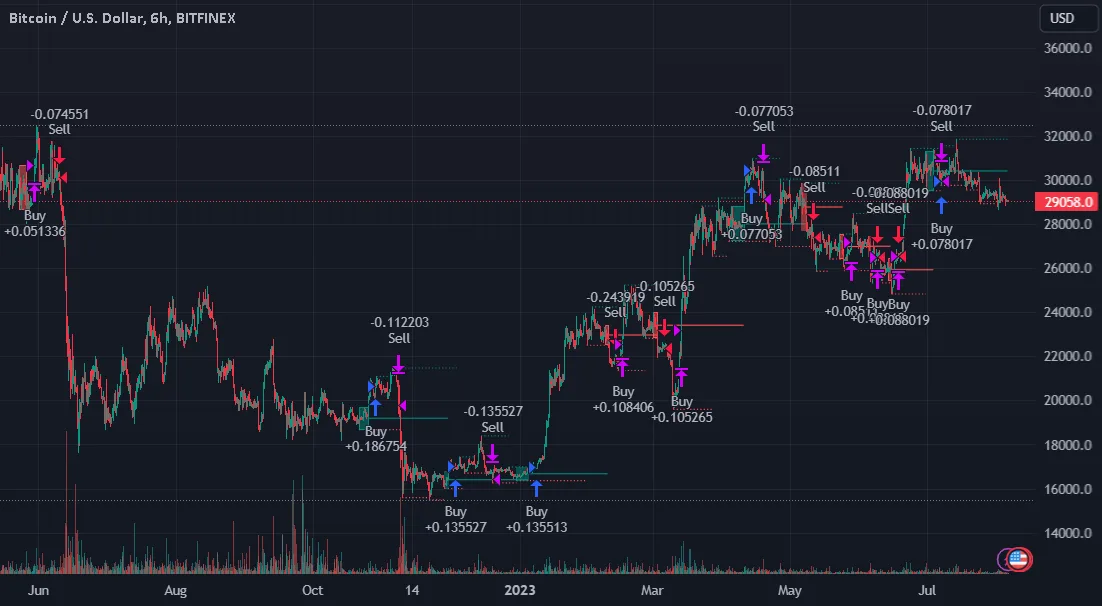
- The author chart is Bitfinex BTCUSD on 6 hours. Backtest other venues, symbols or intervals on their own, and consider retuning the contraction lookback.
Installing it on TradingView
- Download the .pine file from Coinpred (active membership required, see below), or check the original page for the latest version.
- Open the Pine Editor on TradingView, create a blank script, paste the full source and save.
- Click Add to chart; start with BTCUSD 6-hour so you can compare with the author image.
- Choose the trade direction and stop type. If you use the fixed-percentage stop, remember that 0.1 means 10%.
- Study breakouts, stops and opposite-side exits in the Strategy Tester before setting alerts. Past results do not guarantee future returns.
About backtest figures
Source, license and version
- Author: PresentTrading. Original title: Liquidity Breakout - Strategy [presentTrading]. Version 2.0 (pine-facade). The publication page says the idea is mainly inspired by LuxAlgo’s Master Pattern.
- License: Mozilla Public License 2.0 (MPL 2.0). Coinpred provides the full, unmodified source.
- Original page: https://www.tradingview.com/script/UUHabgvo-Liquidity-Breakout-Strategy-presentTrading/
- Pine version: v5; script type: strategy().
- Images come from the author’s publication page, are not covered by the MPL, and are captioned “Author chart”.
- Downloads are subject to Coinpred membership terms. If you modify the source file, the modified file must remain under MPL 2.0.