The idea
This is a long-only Bill Williams–style trend system. Awesome Oscillator (momentum) and Acceleration/Deceleration (acceleration) are stacked into “trading zone” signals; Williams Alligator teeth and fractals approximate the short-term trend; a longer EMA keeps counter-trend trades out.
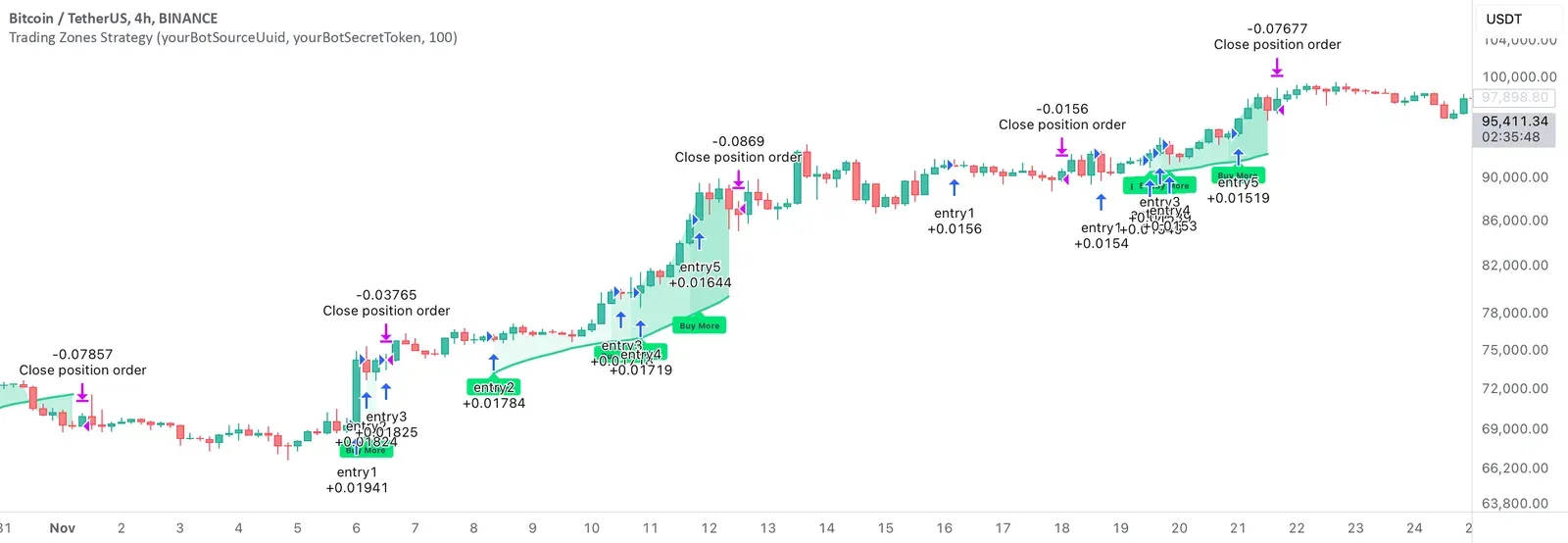
Unlike a single in-and-out design, the source allows up to five layered entries while the setup remains valid. Exits come from a trend flip or from a stop level recorded when the zone strengthens. It is a Pine Script v6 strategy(), ready for the Strategy Tester.
Indicators
- AO: SMA(hl2, 5) − SMA(hl2, 34). AC: AO − SMA(AO, 5). Rising AO and AC together feed a “green bar” counter.
- Williams fractals: pivot high/low with two bars on each side, used to refresh upper and lower fractal levels.
- Alligator teeth: 8-period SMMA of hl2, shifted forward by 5 bars. Fractal breaks relative to teeth mark trend as +1 or −1.
- Filter EMA: 100-period EMA of the close by default; green bars and entries require the close above it.
- qtyGreenBars: increments when close > teeth, AC is rising, AO is rising and close > filter EMA; otherwise resets to zero.
Entry rules
- Long only; up to five stacked entries (entry1…entry5, pyramiding = 5).
- When open trades are 0–4, if the close is above the prior close, qtyGreenBars is between 2 and 6 inclusive, and time is inside the trading window, another long is opened.
- Default size is 10% of equity per entry, with 0.1% commission and slippage set to 5.
- Logic runs on bar close (calc_on_every_tick = false); Strategy Tester fill timing still follows TradingView defaults.
Exits and position sizing
- When qtyGreenBars equals 5, the bar’s low is stored as stopLossLevel.
- closeCondition is true when trend flips from +1 to −1, or when low breaks stopLossLevel. Either case calls strategy.close_all.
- There is no fixed take-profit multiple; gains rely on trend continuation and adds, while risk relies on the trend flip or that stop level.
- Inputs sourceUuid / secretToken plus JSON alert templates support the author’s bot hooks. Coinpred ships the source unchanged and does not fill those fields for you.
Inputs (source defaults)
| Input | Default | Purpose |
|---|---|---|
| EMA Length | 100 | Length of the long-term filter EMA |
| Trade Start / Stop Date | 2023-01-01 / 2026-01-01 | Allowed trading window |
| sourceUuid / secretToken | placeholders | Bot alert placeholders |
| default_qty_value | 10 | 10% of equity per entry |
| pyramiding | 5 | Up to five concurrent longs |
| commission_value | 0.1 | Commission percent |
| slippage | 5 | Slippage in ticks |
Things to know before using it
- It is long-only; there is no short branch.
- Add-on rules nearly match the first entry, so exposure can grow quickly in a strong trend—size total risk before live use.
- The stop is the low of the bar where green bars hit 5; it is not guaranteed to sit on a clean structure low, and gaps can widen the fill.
- Fractal confirmation lags by two bars on each side, so trend marks appear after extremes.
- The author chart is BTCUSDT on 4 hours. Backtest other markets or timeframes on their own and consider re-tuning the EMA length.
Installing it on TradingView
- Download the .pine file from Coinpred (active membership required, see below), or check the original page for the latest version.
- Open the Pine Editor on TradingView, create a blank script, paste the full source and save.
- Click Add to chart. You should see Alligator-related lines and “Buy More” labels when adds fire.
- Check the defaults against the table above, then adjust the EMA and trading window for your market.
- Study signals and fills in the Strategy Tester before setting alerts. Past results do not guarantee future returns.
About backtest figures
Source, license and version
- Author: Skyrexio. Original title: AO/AC Trading Zones Strategy [Skyrexio]. Version 1.0 (pine-facade).
- License: Mozilla Public License 2.0 (MPL 2.0). Coinpred provides the full, unmodified source.
- Original page: https://www.tradingview.com/script/Tkrjao7P-AO-AC-Trading-Zones-Strategy-Skyrexio/
- Pine version: v6; script type: strategy().
- Images come from the author’s publication page, are not covered by the MPL, and are captioned “Author showcase”.
- Downloads are subject to Coinpred membership terms. If you modify the source file, the modified file must remain under MPL 2.0.